
In 2026, AI has become an essential part of everyday life. From automating tasks to generating creative content, OpenAI tools are revolutionizing productivity and innovation for individuals and businesses alike. This guide will explore the top OpenAI tools available in 2026, their features, and how they can help you save time, boost creativity, and work smarter.
What Are OpenAI Tools?
OpenAI tools are applications powered by OpenAI’s cutting-edge artificial intelligence models. They use machine learning, natural language processing, and generative AI to perform tasks that previously required human effort. These tools range from AI chatbots to image generators, coding assistants, and speech-to-text applications, enabling users to streamline workflows and unlock new creative possibilities.
Top OpenAI Tools in 2026
1. ChatGPT – AI Conversation and Assistance
ChatGPT is one of the most advanced and widely used AI tools developed by OpenAI. It uses natural language processing to understand and respond in a conversational way, making it highly versatile. Whether you need to draft emails, write reports, generate content, or get answers to complex questions, ChatGPT serves as a powerful virtual assistant. It also helps brainstorm ideas and can even assist with coding or learning new topics. Ideal for students, professionals, and business owners, ChatGPT can save hours of work by automating tasks that would normally require significant human effort.
Key Features of ChatGPT:
- Generate Human-like Conversations – Engage in natural, realistic interactions.
- Content Assistance – Draft emails, articles, reports, and creative writing.
- Instant Answers & Suggestions – Quick responses for research or problem-solving.
- Brainstorming & Idea Generation – Generate new ideas for projects or businesses.
- Coding Help – Support with coding, debugging, and programming explanations.
- Time-Saving – Automates repetitive tasks for efficiency.
2. DALL·E – AI Image Generation
DALL·E is OpenAI’s powerful image generation tool that turns text prompts into realistic or creative images. Whether you’re designing marketing visuals, creating social media graphics, or exploring artistic concepts, DALL·E allows users to bring ideas to life without needing design skills. In 2026, it offers enhanced realism, customization, and faster generation times, making it perfect for creators, marketers, and businesses.
Key Features of DALL·E:
- Text-to-Image Generation – Create visuals directly from descriptive prompts.
- Customizable Styles – Adjust colors, themes, and artistic styles.
- Marketing & Social Media Use – Generate content quickly for campaigns.
- Creative Freedom – Explore unique concepts and artistic experiments.
- Time-Efficient – No design software skills needed; instantly produces images.
3. Codex – AI for Developers
OpenAI Codex is a coding assistant that converts natural language into programming code. Developers, from beginners to experts, can use Codex to write scripts, debug code, and automate repetitive coding tasks. It supports multiple programming languages and integrates with popular IDEs, helping teams and individuals accelerate their development processes and improve accuracy.
Key Features of Codex:
- Code Generation – Convert natural language instructions into code.
- Debugging Assistance – Identify and fix errors faster.
- Supports Multiple Languages – Works with Python, JavaScript, C++, and more.
- Learning Tool – Helps beginners understand programming concepts.
- Workflow Automation – Speeds up repetitive coding tasks.
4. Whisper – AI Speech-to-Text
Whisper is OpenAI’s advanced speech recognition tool that converts audio into text accurately and quickly. It supports multiple languages and accents, making it ideal for transcribing meetings, podcasts, interviews, or lectures. Whisper is highly valuable for content creators, journalists, and professionals who need precise transcription without spending hours manually typing.
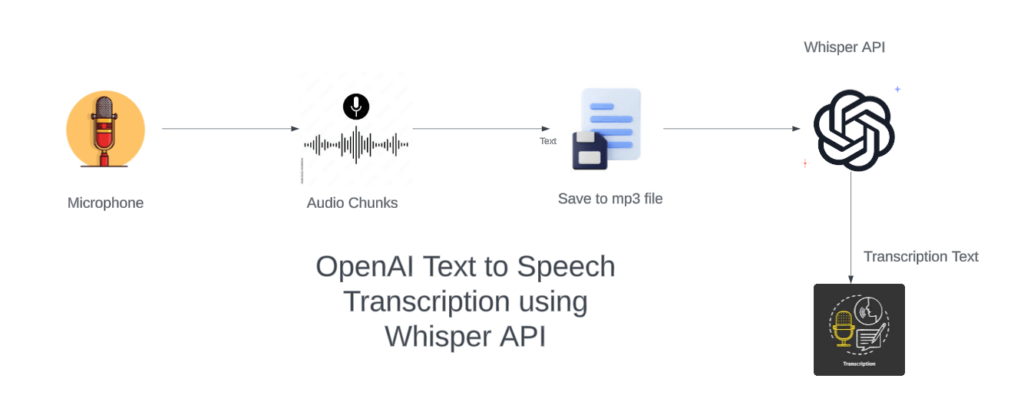
Key Features of Whisper:
- Accurate Transcription – Converts speech into text reliably.
- Multilingual Support – Recognizes many languages and accents.
- Time-Saving – Automates lengthy transcription work.
- Content Creation – Useful for podcasts, interviews, and lectures.
- Integration Friendly – Can be combined with other AI and productivity tools.
5. AI Productivity Tools
OpenAI powers a variety of productivity-focused tools that help users automate tasks, generate content, and analyze data. These tools include AI writing assistants, automated summarizers, and AI-powered analytics platforms. They integrate with software like Microsoft Word, Excel, and Google Workspace, helping individuals and businesses improve efficiency, accuracy, and scalability.
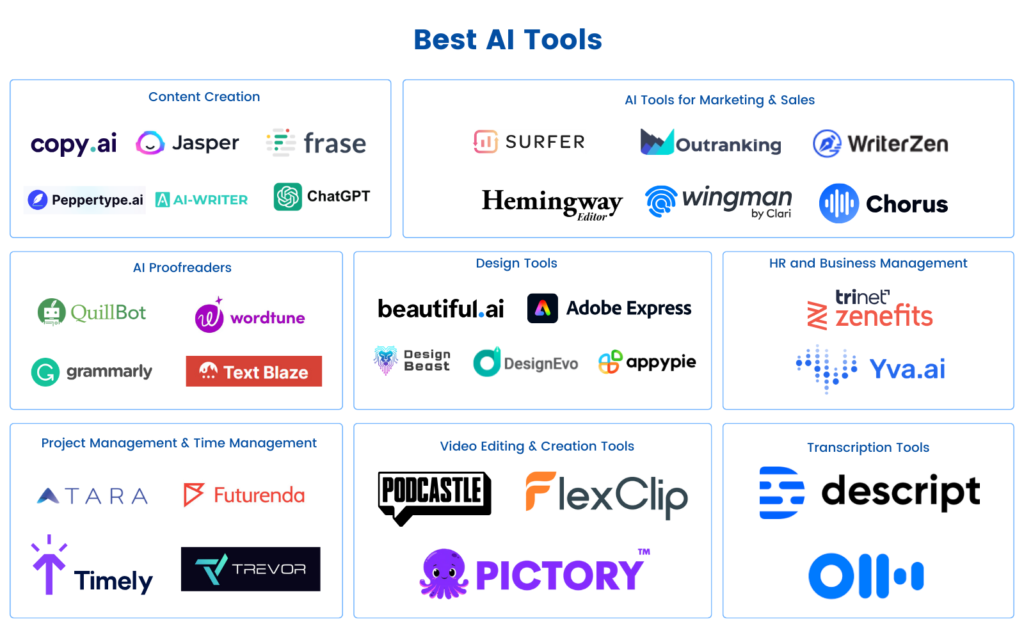
Key Features of AI Productivity Tools:
- Automated Writing – Generate blogs, social posts, and reports.
- Summarization – Quickly condense long documents and research.
- Data Analysis – Extract insights from spreadsheets or databases.
- Integration – Compatible with major office software.
- Scalability – Helps businesses streamline operations.
How to Choose the Right OpenAI Tool for You
Choosing the right tool depends on your needs:
- Identify your task – Writing, coding, designing, or analyzing.
- Check integrations – Ensure it works with your existing software.
- Evaluate ease of use – Some tools are beginner-friendly; others require technical knowledge.
- Consider cost – Free vs. premium versions with advanced features.
Benefits of Using OpenAI Tools in 2026
- Time-Saving – Automate repetitive tasks.
- Enhanced Creativity – Generate ideas instantly.
- Improved Accuracy – Reduce errors in writing, coding, or transcription.
- Scalability – Businesses can scale efficiently with AI assistance.
- Accessibility – Makes complex tasks easier for everyone.
Future of OpenAI Tools
In the coming years, OpenAI tools are expected to:
- Integrate deeply with daily applications.
- Offer more human-like AI interactions.
- Expand into virtual reality (VR) and augmented reality (AR).
AI is no longer just a tool — it’s becoming a collaborative partner in work, creativity, and learning.
| Tool Name | Description | Official Link |
|---|---|---|
| ChatGPT | AI conversational assistant for text queries, drafting, research, and problem-solving. | https://chat.openai.com/ |
| ChatGPT Health | Specialized health-related AI features integrated in ChatGPT (with privacy and record linking) | (via ChatGPT dashboard) |
| Deep Research | AI agent within ChatGPT that conducts deep research and produces cited reports. | https://openai.com/index/introducing-deep-research/ |
| DALL·E | AI image generation from text prompts. | https://openai.com/dall-e |
| Codex (Code Generation) | Converts natural language into code and helps with coding tasks. | Via OpenAI API |
| Whisper | Speech-to-text transcription AI that supports multiple languages. | Via OpenAI API |
| Responses API | Unified API for building advanced agentic AI tools (search, file tools, etc.). | https://openai.com/index/new-tools-and-features-in-the-responses-api/ |
| Embedding Tools | Transforms text into numerical vectors for semantic analysis. | Via OpenAI API |
| API & SDK Tools | Python SDK, command-line tools, and developer toolkits. | https://platform.openai.com/ |
Disclaimer
This blog is for informational purposes only. Features, pricing, and availability of OpenAI tools may change. Always refer to official OpenAI sources for the latest updates.
#OpenAITools #ChatGPT #Dalle #AI2026 #ArtificialIntelligence #DeepResearch #WhisperAI #Codex #AIProductivity #FutureOfWork #TechTrends2026 #AIAutomation #BestAITools #OpenAIUpdates #MachineLearning #GenerativeAI #Carrerbook#Anslation#AIRevolution #DigitalTransformation #TechInnovation #AIFuture