
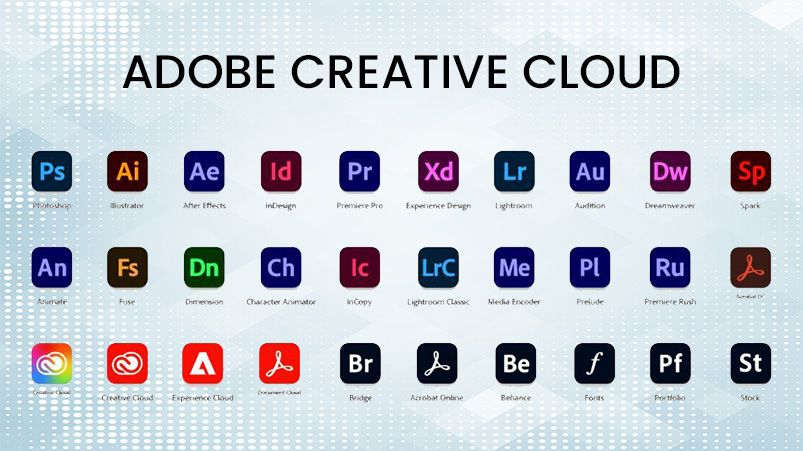
Adobe Creative Cloud has transformed the world of digital design and graphics, providing designers, artists, and creators with a comprehensive suite of tools to bring ideas to life. From photo editing and vector design to animation and 3D modeling, Creative Cloud offers powerful, integrated applications that cater to professionals and beginners alike.
At the core of Creative Cloud are apps like Photoshop, Illustrator, and InDesign, which are staples in the creative industry. Photoshop allows users to edit photos, create stunning digital artwork, and leverage AI-powered tools like Generative Fill for faster and more precise image creation. Illustrator focuses on vector graphics, enabling the creation of logos, icons, typography, and scalable artwork that maintains quality at any size. InDesign is essential for publishing, letting designers craft magazines, brochures, eBooks, and other layouts with precision and professional polish.
For creators who want quick and accessible design solutions, Adobe Express offers an intuitive platform to make social media graphics, banners, and marketing visuals using pre-designed templates. Meanwhile, Adobe Firefly, the AI-powered design engine, enhances the creative process by generating images, effects, and design suggestions based on user input, bridging the gap between imagination and execution.
Video and motion graphics are equally strong in Creative Cloud. Premiere Pro provides professional video editing capabilities, while After Effects brings motion graphics and visual effects to life. For audio, Audition allows precise editing, mixing, and mastering. Meanwhile, Animate enables designers to create interactive animations for web and apps. Together, these tools make Creative Cloud a one-stop solution for digital storytelling and multimedia production.
Creative Cloud also extends into 3D and augmented reality. Substance 3D Painter and Substance 3D Stager allow artists to texture, paint, and stage realistic 3D objects, while Aero supports immersive AR experiences. These tools empower designers to experiment beyond traditional 2D graphics and create interactive, cutting-edge visuals.
Collaboration and accessibility are central to Creative Cloud. Cloud-based storage ensures that projects are accessible from anywhere, while real-time collaboration features allow teams to share assets, track changes, and provide feedback seamlessly. Mobile apps extend the creative workflow to tablets and smartphones, letting users work on projects wherever inspiration strikes.
In addition to creative apps, Adobe offers stock assets through Adobe Stock, giving users access to millions of royalty-free images, videos, templates, and 3D models. This integration saves time and enriches projects with high-quality visuals, enhancing both professional and personal work.
Creative Cloud Design & Graphics Tools: Features & How They Work
1. Photoshop
Adobe Photoshop is the industry-standard tool for photo editing, image manipulation, and digital art. Its key features include layer-based editing, advanced selection tools, filters, AI-powered Generative Fill, and content-aware adjustments. You can work in Photoshop by importing an image, creating layers for non-destructive edits, applying color adjustments, and using masks to isolate effects. AI tools allow automatic background removal or object replacement, saving time for complex edits.
2. Illustrator
Adobe Illustrator is focused on vector graphics, perfect for creating logos, icons, typography, and scalable artwork. Its features include pen tools for precise paths, shape builder, gradient meshes, and vector brushes. You work in Illustrator by drawing or tracing shapes, combining paths, adjusting anchor points, and applying fills and strokes. Because vector graphics are resolution-independent, designs remain sharp at any size, making it ideal for print and digital media.
3. InDesign
Adobe InDesign is used for layout and publishing. It is designed for magazines, brochures, eBooks, and multi-page documents. Key features include master pages, paragraph and character styles, text wrapping, and preflight checks. To work in InDesign, you start with a document template or page setup, place text and images, format layouts with grids and guides, and export as PDF or interactive formats. Its integration with Creative Cloud ensures images and assets from Photoshop or Illustrator sync seamlessly.
4. Adobe Express
Adobe Express is a simplified, template-driven platform for quick graphic creation. Its features include pre-built templates, drag-and-drop editing, royalty-free images, and text styling. You work in Adobe Express by choosing a template or blank project, customizing text, colors, images, and icons, and then exporting designs for social media, marketing, or web use. It’s beginner-friendly and fast for small projects.
5. Firefly
Adobe Firefly is an AI-powered creative tool that generates images, effects, and designs from text prompts. Features include text-to-image, style transfer, and AI-assisted enhancement. To use Firefly, you type your description, select the style or mood, and the AI generates options, which you can refine, edit, and download for further work in Photoshop or Illustrator.
6. Premiere Pro
Premiere Pro is Adobe’s professional video editing software. Key features include timeline-based editing, multi-camera support, color correction, transitions, and audio mixing. You work in Premiere Pro by importing video clips, arranging them on the timeline, applying effects and transitions, adjusting color and sound, and exporting in various formats for web, broadcast, or cinema.
7. After Effects
After Effects specializes in motion graphics and visual effects. Its features include keyframing, 3D composition, particle effects, and animation presets. To work in After Effects, you create a composition, layer elements, animate objects using keyframes, and apply effects for cinematic results. It integrates with Premiere Pro to enhance video projects with complex graphics.
8. Substance 3D Tools
Substance 3D Painter and Stager allow artists to create, texture, and render 3D objects. Features include material libraries, PBR texturing, and real-time rendering. You work in Substance 3D by importing a 3D model, painting textures directly, applying materials, and previewing results in realistic environments before exporting to other Adobe tools or 3D platforms.
9. Aero
Adobe Aero is for augmented reality creation. Its features include interactive AR scenes, 3D model integration, triggers, and behaviors. You work in Aero by importing 3D models or assets, defining interactions, and previewing your AR experience on mobile or desktop. The final scene can be shared online or embedded into apps.
10. Collaboration & Cloud Integration
All Creative Cloud tools are integrated via cloud storage, asset syncing, and collaboration features. This means you can save projects in the cloud, access them from any device, and collaborate in real-time with team members, making workflows seamless across apps and platforms.
In today’s digital-first world, mastering Creative Cloud design and graphics tools is no longer optional for professionals and enthusiasts. Whether you are editing images, designing marketing materials, creating animations, or experimenting with 3D and AR, Creative Cloud equips you with the technology, flexibility, and creative freedom to deliver exceptional results.
Creative Cloud combines photo editing, vector design, layout, video, 3D, AR, and AI-powered tools into a single ecosystem. Each app has specialized features for different tasks, but their integration via cloud and shared assets allows creators to work faster, more efficiently, and collaboratively.
#AdobeCreativeCloud #GraphicDesignTools #Photoshop #Illustrator #InDesign #CreativeCloud2026 #DigitalArt #VideoEditing #MotionGraphics#Carrerbook#Anslation #3DDesign #AdobeExpress #FireflyAI #CreativeWorkflow #DesignProfessionals #GraphicDesign #DigitalCreativity #VideoProduction #ARDesign #DesignTools #CreativeApps
Latest Posts :
- Future Technology & AI Trends to Watch in 2026
- Essential Digital Lifestyle Trends for a Smarter 2026

- Agentic AI Explained: Why This Technology Changes Everything

- Agentic AI Breakthrough: The Future of Self-Acting AI Systems

- AI Innovation in 2026: Trends That Will Change the World
- AI Innovation in Business: How Companies Are Automating Growth