
Adobe Lightroom remains one of the most powerful and accessible photo editing tools available in 2026, designed specifically to help photographers transform ordinary images into exceptional visual stories. Whether you are a beginner or a professional creator, Lightroom offers an intelligent workflow that combines editing, organizing, and sharing into one cohesive experience. Its modern interface is built to enhance creativity while delivering reliable tools optimized for speed, clarity, and color accuracy.

At the heart of Lightroom is its non-destructive editing system. Instead of altering the original file, every adjustment you make is saved as metadata, allowing you to experiment freely—adjust shadows, tweak color tones, or sharpen details—without any fear of losing your original image. This makes Lightroom ideal for photographers who take hundreds or thousands of shots and need flexibility throughout the editing process.
The magic of Lightroom lies in its deep control over light, color, and detail. With professional-grade tools like Exposure, Contrast, Highlights, Shadows, Whites, Blacks, Texture, Clarity, and Dehaze, users can fine-tune every aspect of their images. The Color Mixer and Tone Curve provide more advanced controls, letting creators isolate hues, adjust luminance, add cinematic tones, and bring personality to every photograph. Whether it’s a bright landscape, a moody portrait, or a dramatic sunset, Lightroom ensures that color grading feels artistic, not technical.
Lightroom also simplifies photo organization and workflow management. Using collections, albums, filters, and smart tagging, users can locate files instantly and build clean project libraries. AI enhancements like automatic subject detection and content search mean you can find images by people, objects, or theme—even without manually tagging. For professional photographers working with large libraries, this is a massive time-saver.
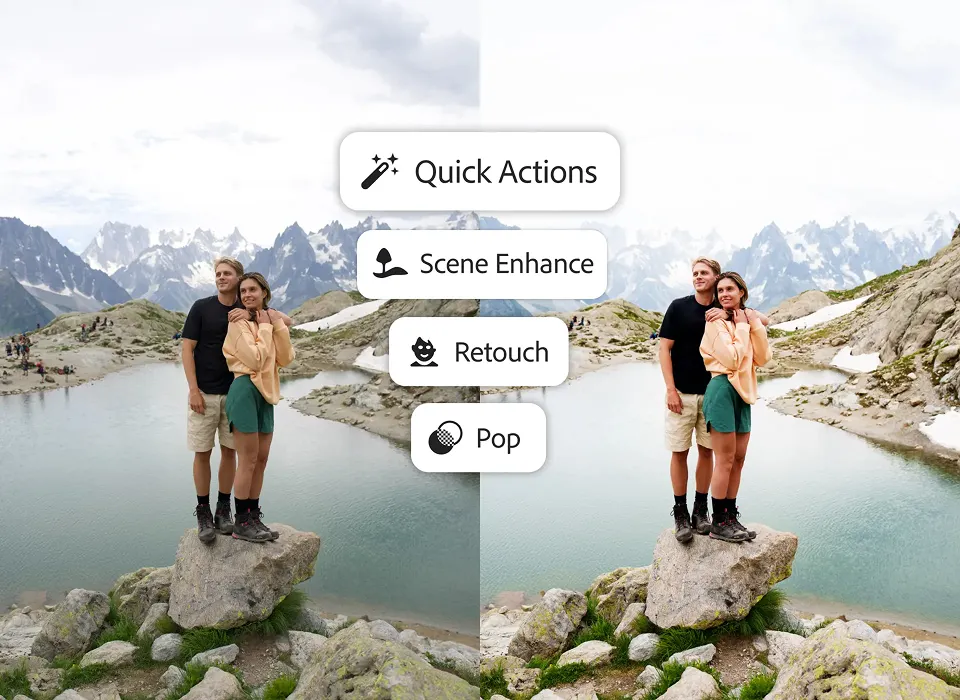
A standout feature in recent versions is the ability to use AI-powered masking and selection tools. Lightroom automatically identifies subjects, backgrounds, skies, and even fine details like hair edges. Creators can now apply selective edits with precision—brightening a subject without overexposing the sky or boosting color in a model’s clothing without affecting skin tones. These intelligent selections elevate the editing workflow to a level previously possible only in advanced software.
Lightroom is also known for its presets, which allow users to instantly apply entire editing styles with one click. You can use built-in presets, purchase professional packs, or create your own custom looks that match your creative identity. For social media creators and brands, presets help maintain a consistent visual style across feeds and campaigns. Exporting and sharing is equally efficient, with optimized settings for Instagram, web, print, and high-resolution files.
Beyond the desktop experience, Lightroom Mobile brings pro-level editing to your smartphone or tablet. With synced cloud storage, your photos and edits stay updated across devices, letting you shoot, edit, and publish from anywhere. Whether you’re traveling, uploading directly from your phone camera, or making quick adjustments on the go, Lightroom ensures professional-quality results are always within reach.
Adobe Lightroom – Key Features
- Non-Destructive Editing
Lightroom keeps the original photo untouched. Every adjustment is stored separately so you can edit, undo, or reset anytime without damaging the image. - Powerful Lighting Controls
Tools like Exposure, Contrast, Highlights, Shadows, Whites, Blacks, Tone Curve allow full control over brightness and balance, helping fix underexposed or overexposed shots. - Advanced Color Grading
Lightroom offers HSL sliders, Color Mixer, Color Grading wheels, and White Balance correction so photographers can create cinematic looks, fix skin tones, or enhance landscapes. - Texture, Clarity & Dehaze Tools
These sliders define detail:- Texture enhances fine details like skin or fabric
- Clarity boosts midtone contrast for dramatic impact
- Dehaze removes fog or haze from outdoor shots
- AI-Powered Masking & Selection
Lightroom automatically detects subjects, skies, backgrounds, and objects, allowing selective edits. You can brighten faces, darken skies, or sharpen objects without affecting the whole image. - Presets for Instant Styling
Apply one-click styles for consistent color tones. You can use built-in presets, buy preset packs, or create your own to develop a signature editing style. - Lens Correction & Geometry Tools
Fix lens distortions, perspective issues, and crooked lines with tools like Transform, Upright, and Profile Corrections, ensuring perfectly aligned photos. - Noise Reduction & Sharpening
Reduce grain in low-light images and bring out crisp details without ruining natural texture — essential for night, wedding, and travel photography. - Smart Photo Organization
Lightroom keeps large libraries organized using albums, collections, star ratings, color labels, and keywords. AI search helps find images instantly by faces, themes, or subject types. - Cloud Sync + Mobile Editing
Photos and edits sync across devices. You can shoot on your phone, touch up on a tablet, and export on your laptop — all from the same cloud library. - Seamless Export & Sharing
Export images optimized for web, print, or social media, choose file size and resolution, and create client galleries — making sharing quicker and more professional.
In an era where visual content is more important than ever, mastering Adobe Lightroom empowers creators to express their stories with clarity, emotion, and style. With innovative AI assistance, powerful manual controls, professional-grade presets, and seamless cloud connectivity, Lightroom 2026 stands as an essential tool for any photographer ready to edit photos like a pro.
#AdobeLightroom #LightroomEditing #PhotoEditing #LightroomTips #PhotographyTools #LightroomPresets #EditLikeAPro #Carrerbook#Anslation#DigitalPhotography #CreativeEditing #PhotoWorkflow #LightroomMobile #ColorGrading #PortraitEditing #LandscapePhotography #ProEditingTools
Latest Posts :
- Agentic AI Explained: Why This Technology Changes Everything

- Agentic AI Breakthrough: The Future of Self-Acting AI Systems

- AI Innovation in 2026: Trends That Will Change the World

- AI Innovation in Business: How Companies Are Automating Growth

- What Happened in the Microsoft Outage? CrowdStrike Issue Breakdown & Solutions

- Apple TV Service Down: Check Outage Status & How to Resolve It