
Adobe Bridge is one of the most underrated tools inside the Creative Cloud, yet it is one of the most powerful for managing large collections of photos, graphics, videos, and design files. Whether you are a photographer, content creator, designer, or someone who works with visual assets daily, Bridge works like a central control hub that keeps everything organized, searchable, and easy to use across all Adobe applications.
What is Adobe Bridge?

Adobe Bridge is a digital asset management (DAM) tool that helps creatives preview, organize, rename, tag, rate, and manage files without opening them. Instead of searching folder-by-folder or opening Photoshop for every image, Bridge shows thumbnails, metadata, and file details instantly.
It is especially useful for professionals who work with hundreds or thousands of images, videos, PSDs, Illustrator files, and RAW photos.
Why Creatives Love Adobe Bridge
Adobe Bridge gives creators more control over file organization than standard computer folders. You can browse files visually, add tags, and see complete metadata at a glance. This saves valuable time and keeps projects running smoothly, especially when dealing with multiple clients or large libraries of assets.
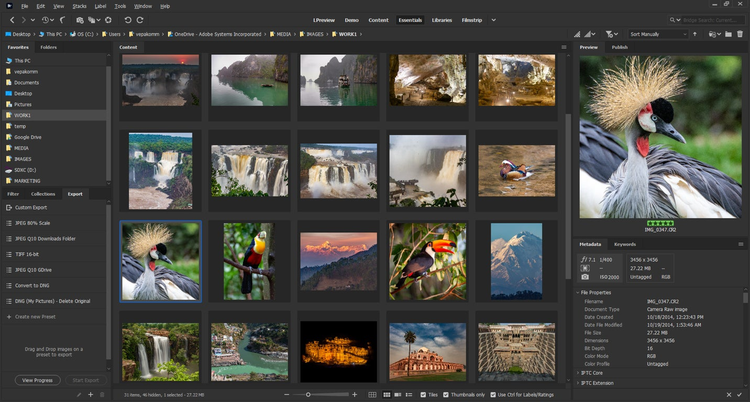
Many users describe Bridge as a creative command center because it links directly with Photoshop, Illustrator, InDesign, After Effects, and Lightroom.
Key Features That Make Adobe Bridge Powerful
Adobe Bridge offers a wide set of features designed to simplify workflow:
Visual Browsing & Previewing
It displays large thumbnail previews of images, graphics, videos, PDFs, and even Adobe project files, allowing you to make selections without opening apps.
Bulk Rename & Batch Actions
You can rename hundreds of files instantly, apply keywords, create labels, or move items in one action—saving hours of manual work.
Metadata Editing
Bridge gives complete access to metadata such as copyright info, camera model, date, ratings, color labels, and keywords. This helps maintain consistency and improves searchability.
Collections & Smart Collections
Collections group files from different folders without moving them. Smart collections auto-update based on rules like rating, keyword, or file type.
RAW Image Management
Bridge integrates with Adobe Camera Raw, letting users preview RAW photos and open them directly in Photoshop.
Seamless Creative Cloud Integration
Bridge syncs with Photoshop, Illustrator, InDesign, Premiere Pro, and more, allowing easy drag-and-drop transfers and fast project assembly.
How Bridge Improves Creative Workflow
Bridge becomes essential when your projects grow and your asset library expands. Instead of guessing file names or browsing endless folders, you can instantly locate what you need using filters, keywords, labels, and ratings. Bridge keeps your workflow organized and stress-free, which means more time designing and less time searching.
For photographers, Bridge replaces the chaos of memory cards and folder dumps by allowing clean sorting, categorizing, previewing, and exporting.
For designers, Bridge ensures logos, fonts, documents, and images stay structured across multiple brand or client projects.
Who Should Use Adobe Bridge?
Adobe Bridge is ideal for:
- Photographers managing RAW images
- Graphic designers who collect digital assets
- Video creators working with multiple clips
- Agencies handling shared libraries
- Students and freelancers organizing project files
- Anyone tired of messy folders and lost files
If your work requires creativity and structure together, Bridge is the perfect companion.
Adobe Bridge is not just a media viewer—it is a workflow booster that gives artists and content creators total control over their digital universe. With powerful previewing, smart organization, and deep Creative Cloud integration, Bridge helps you organize faster, find files instantly, and maintain a professional creative workflow across every project.
#AdobeBridge #AdobeCreativeCloud #DigitalAssetManagement #CreativeWorkflow #FileOrganization #GraphicDesignTools #PhotographerTools #ContentCreationTips #DesignProductivity #CreativeLife #OrganizeYourFiles #Carrerbook#Anslation#AdobeTools #PhotoshopWorkflow #MediaManagement #CreativeInspiration #DesignSoftware #PhotographyWorkflow #CreativeProcess #VisualAssets #CreativeStudio
Latest Posts:
- Agentic AI Explained: Why This Technology Changes Everything

- Agentic AI Breakthrough: The Future of Self-Acting AI Systems

- AI Innovation in 2026: Trends That Will Change the World

- AI Innovation in Business: How Companies Are Automating Growth

- What Happened in the Microsoft Outage? CrowdStrike Issue Breakdown & Solutions

- Apple TV Service Down: Check Outage Status & How to Resolve It