
Photoshop Camera is Adobe’s mobile-first photo app designed to turn everyday shots into artwork in just a tap. Powered by Adobe’s advanced AI technology (Adobe Sensei), the app understands what’s inside a photo—faces, skies, food, landscapes—and applies intelligent filters that automatically enhance lighting, tone, color, and mood.
It’s photography and editing blended into a single, seamless experience.
What Makes Photoshop Camera Different
Unlike traditional editing apps that require sliders, layers, or complicated settings, Photoshop Camera focuses on smart filters and automatic editing. As soon as you take a picture, the app analyzes the scene and suggests the best look, effect, or lens. Even beginners can capture professional-grade content without any design knowledge.
Creators get the power of Photoshop, but with the simplicity of a smartphone interface.
AI-Powered Filters That Transform Your Photos
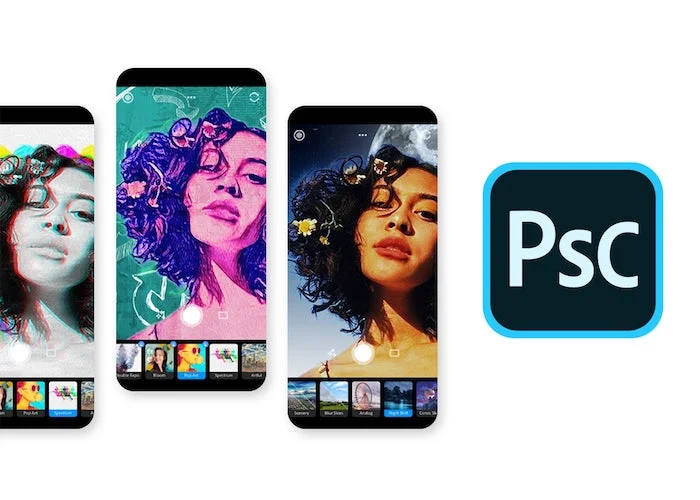
The standout feature of Photoshop Camera is its collection of AI-driven lenses—dynamic filters created by Adobe and artists from around the world. These filters can reshape skies, intensify colors, add surreal lighting, remove dull shadows, and bring cinematic looks to mobile photography.
Whether you want dreamy bokeh portraits, futuristic neon lighting, stylized skies, or natural enhancements, the app does the heavy lifting automatically.
Perfect for Social Media Creators
Photoshop Camera is designed with today’s digital lifestyle in mind. Content creators, influencers, vloggers, and photographers can instantly produce striking visuals ready for Instagram, TikTok, YouTube thumbnails, and more.
Fast edits and share-ready formats mean more creativity and less time spent in post-production. The app encourages experimentation without technical complexity.
Seamless Creative Cloud Integration
Photoshop Camera works smoothly with other Adobe apps. Images you capture and edit can move into Adobe Express, Lightroom, or Photoshop for additional refinement. Professionals who start on mobile can continue on desktop without losing quality or creative control.
This makes Photoshop Camera not just a standalone tool, but an important part of a complete creative workflow.
Creativity Anywhere, Anytime
With Photoshop Camera, the camera becomes more than a capture device—it becomes a creative studio in your pocket. No heavy equipment, no technical editing knowledge, no waiting. Whether you’re traveling, at an event, or experimenting at home, the app allows you to create content instantly and share visual stories that stand out.
Adobe has democratized creativity, making powerful photo aesthetics available to everyone.
Photoshop Camera — Features
- AI-Powered Auto Enhancement
Adobe Sensei analyzes exposure, contrast, highlights, skin tones, and clarity the moment you capture a photo. Instead of manually correcting shadows or color balance, the app automatically applies intelligent improvements so your shots look polished straight from the camera. - Dynamic Smart Lenses & Filters
Photoshop Camera includes a growing library of “lenses,” each with multiple variations. These aren’t simple overlays — they are adaptive filters that reshape visuals based on what the camera sees. Skies become dramatic, portraits gain natural depth, and food photos appear richer and more vibrant, all without manual adjustments.
- Real-Time Live Preview
Unlike most photo editors that require editing afterward, Photoshop Camera applies its lenses live. You see the artistic or cinematic transformation before you press the shutter, which helps creators compose more thoughtfully and reduces time spent editing after the fact. - Portrait Effects & Natural Depth Control
The app identifies faces, edges, and backgrounds and creates depth simulation similar to DSLR portrait modes. It automatically softens the background, enhances facial details, brightens eyes, and smooths skin tones — all subtly, with no retouching sliders required. - Smart Scene Recognition
Whether you’re shooting a sunset, skyline, selfie, pet, night street, or food table, the camera detects the subject type and applies filters perfectly suited to the environment. This means you always get colors and tones optimized for the mood of the shot. - Instant Social Media-Ready Output
Every image exports in formats ideal for Instagram, TikTok, Facebook, Stories, or Reels. No resizing or cropping frustrations — you get shareable results immediately, making it ideal for creators who post daily or on-the-go. - Creative Cloud Connectivity
You can save directly to your Adobe account or move photos into Lightroom Mobile or desktop Photoshop. This is a perfect pathway for users who want fast AI results first, then fine-tune details later with full professional tools. - Artist-Designed Lens Packs
Adobe collaborates with creators to release specialty lenses — fantasy, pop-art, retro film, astrophotography skies, comic-style filters, and more. These constantly refresh the app, so users always have new creative styles without buying add-ons.
Photoshop Camera turns imagination into reality by combining smart technology with artistic expression. From subtle enhancements to bold visual effects, the app gives every user—from beginners to professionals—the tools to create stunning images at the speed of inspiration.
#PhotoshopCamera #AdobePhotoshopCamera #AdobeCreativeCloud #AIFilters #MobilePhotography #PhonePhotography #DigitalPhotography #CreativeCameraApp #PhotoEditingApps #SocialMediaPhotography #Carrerbook#Anslation#MobileEditing #ContentCreatorTools #AdobeSenseiAI #PhotoFilters #PhotographyTips #VisualCreators #DesignTools #CreativeLifestyle #InstantEditing