
Axure RP 10 is a powerful UX prototyping and wireframing tool designed for professionals who need advanced interaction logic, dynamic content, and data-driven prototypes. Widely used by UX designers, product managers, business analysts, and enterprise teams, Axure RP 10 enables the creation of highly functional prototypes that go far beyond static screens.
Understanding Axure RP 10
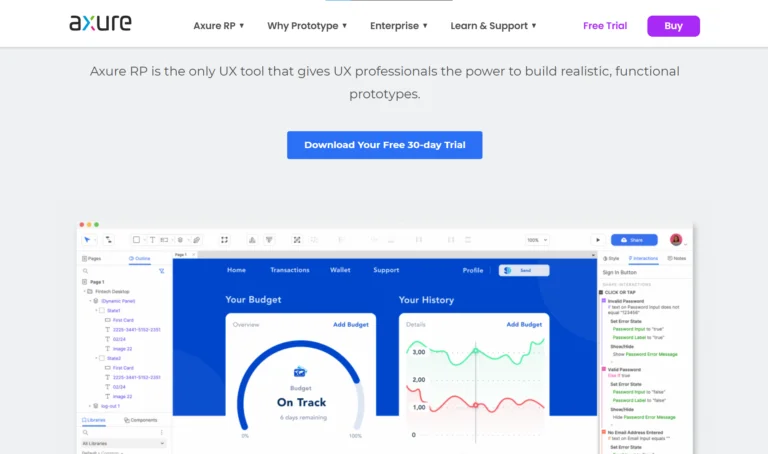
Axure RP 10 is built for teams that want to simulate real product behavior before development begins. Unlike simple design tools focused on visuals, Axure emphasizes functionality, logic, and user flow, making it ideal for complex applications, enterprise software, and systems with detailed workflows.
How Axure RP 10 Works
Axure RP 10 allows designers to build wireframes and prototypes using drag-and-drop elements, then enhance them with interactions, conditions, and variables. Designers can define how elements behave based on user actions, such as clicks, form inputs, or page loads. This creates prototypes that behave much like a real application, helping teams validate UX decisions early.
Advanced Interaction & Logic Capabilities
One of Axure RP 10’s strongest features is its logic-based prototyping system. Designers can use conditional logic, variables, and dynamic panels to control content and behavior. This makes it possible to simulate complex scenarios such as multi-step forms, dashboards, role-based interfaces, and decision-driven user journeys.
Dynamic Content & Data-Driven Prototypes
Axure RP 10 supports dynamic content, allowing UI elements to change based on user input or system conditions. Designers can create realistic data tables, repeaters, and adaptive layouts that closely resemble real-world applications. This is especially useful for testing usability in enterprise and data-heavy products.
| Element | Purpose | Example Use |
|---|
| Variables | Store and update data | User login state |
| Repeaters | Display dynamic lists or tables | Product listings |
| Dynamic Panels | Show/hide content based on logic | Tabs, popups |
| Conditions | Control logic behavior | If/else actions |
| Interactions | Trigger changes | Click, hover |
Collaboration & Team Communication
Axure RP 10 supports collaboration through shared projects, team libraries, and online publishing. Teams can review prototypes in the browser, leave comments, and provide feedback directly on screens. This centralized communication improves alignment between designers, stakeholders, and developers.
Developer Handoff & Documentation
Axure RP 10 helps bridge the gap between design and development by providing detailed specifications, interaction notes, and documentation. Developers can clearly understand how components behave, reducing confusion and minimizing rework during implementation.
Prototyping for User Testing
Prototypes created in Axure RP 10 are ideal for usability testing and stakeholder validation. Because interactions feel realistic, teams can observe genuine user behavior, identify friction points, and refine the experience before development resources are committed.
- Realistic User Interaction Simulation
Axure RP 10 allows teams to create highly functional prototypes that behave like real applications, helping users interact naturally during testing. - Early Usability Issue Detection
By testing prototypes before development, teams can identify usability problems, navigation issues, and workflow gaps at an early stage. - Validation of User Flows
Designers can test multi-step journeys, decision paths, and complex workflows to ensure the experience is intuitive and efficient. - Testing Logic-Based Scenarios
Conditional logic and variables enable testing of real-world scenarios, such as form validation, error handling, and role-based content. - Improved Feedback Quality
When users interact with realistic prototypes, the feedback collected is more accurate, actionable, and meaningful.
Who Should Use Axure RP 10
Axure RP 10 is best suited for experienced UX professionals, enterprise teams, business analysts, and product designers working on complex systems and workflows. It is especially valuable for projects where logic, data handling, and detailed interactions are critical.
Benefits of Using Axure RP 10
Using Axure RP 10 enables teams to prototype complex functionality, validate UX logic early, reduce development risks, and improve collaboration. It supports informed decision-making and leads to more efficient, user-centered product development.
Why Axure RP 10 Matters in 2026
As digital products become more complex, UX teams need tools that go beyond visual design. Axure RP 10 continues to be relevant in 2026 because it allows teams to test real functionality, manage complexity, and deliver confident UX solutions before a single line of code is written.
Axure RP 10 is a professional-grade UX prototyping tool that makes complex interaction design manageable and efficient. While it requires a deeper understanding of UX logic, it empowers teams to create realistic, functional prototypes that drive better design outcomes. For serious UX work, Axure RP 10 remains a trusted and powerful solution.
#UXDesigner #ProductDesigner #DesignCommunity#DigitalDesign #ModernUX#DynamicContent #DataDrivenDesign #UXLogic#UserFlows #DesignSystems#Carrerbook#Anslation