
Figma is a powerful, cloud-based UI/UX design and prototyping tool that helps designers, developers, and product teams create, collaborate, and deliver digital designs faster. It is widely used for designing websites, mobile apps, dashboards, landing pages, and software interfaces—all in one place. Since Figma works directly in the browser, there’s no heavy software installation required, making it accessible from anywhere.
Why Figma Is So Popular Among Designers
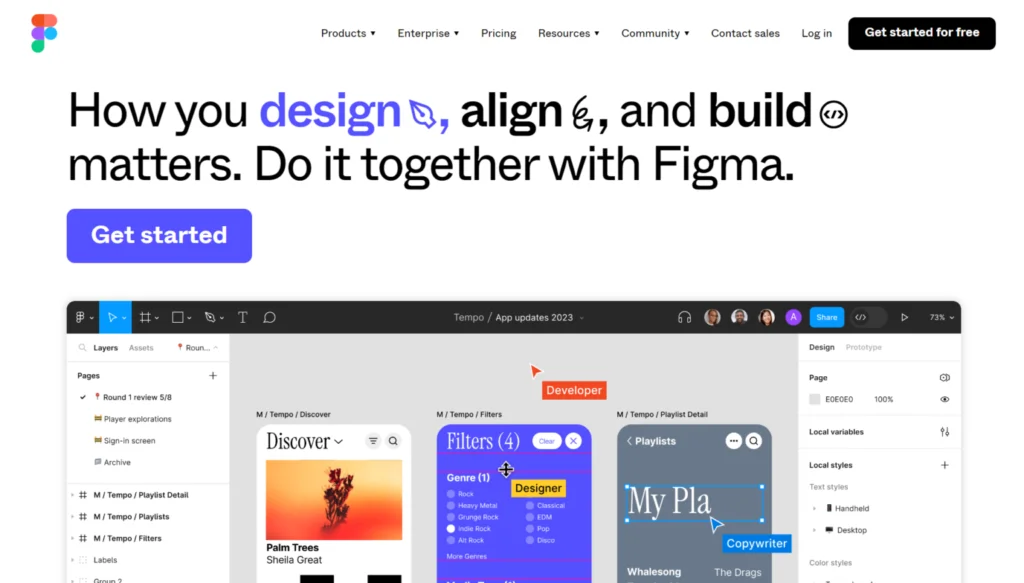
One of the biggest reasons Figma stands out is its real-time collaboration feature. Multiple team members can work on the same design simultaneously, leave comments, suggest changes, and see updates instantly. This makes Figma ideal for remote teams, agencies, startups, and enterprises that need fast communication and smooth workflows.
Figma for Developers and Teams
Figma makes developer handoff extremely easy. Developers can inspect designs, check measurements, download assets, and view CSS-like properties directly from the file. This reduces misunderstandings and speeds up development time.
Teams can also use comments and version history to track changes, review designs, and revert to previous versions whenever needed. This makes collaboration transparent and stress-free.
Figma FigJam: Visual Brainstorming Tool
FigJam, a part of Figma, is a digital whiteboard used for brainstorming, wireframing, user journey mapping, flowcharts, and team discussions. It’s especially useful during the early planning and ideation phase of a project.
How Figma Works
Figma works entirely online. You create a project, design screens using tools like shapes, text, images, and components, then share a link with your team or clients. Everyone can view, comment, or edit based on permissions. This eliminates the need for endless email attachments and file versions.
Key Features of Figma Explained
Figma’s design editor is intuitive yet powerful. You can create frames, layouts, icons, buttons, typography systems, and color styles with precision. It supports auto layout, which helps designs automatically adjust spacing and alignment—perfect for responsive layouts.
Components and design systems are another strong feature. Designers can create reusable components like headers, buttons, and cards. When one component is updated, it automatically updates everywhere, ensuring design consistency across the entire project.
Prototyping in Figma allows you to turn static designs into interactive prototypes. You can add transitions, animations, hover effects, and user flows to show how an app or website will function—without writing a single line of code.
- Real-Time Collaboration
Multiple users can work on the same design file simultaneously. Team members see live changes, cursors, and comments, making collaboration fast and transparent. - Cloud-Based Platform
Figma runs entirely online, so designs are automatically saved and accessible from anywhere without installing heavy software. - Advanced UI Design Tools
Figma provides frames, vector tools, grids, typography controls, and color styles to create pixel-perfect web and app interfaces. - Components & Design Systems
Reusable components like buttons, headers, and cards ensure design consistency and allow quick updates across all screens. - Auto Layout
Auto Layout dynamically adjusts spacing, alignment, and size, helping designers build responsive and flexible layouts easily. - Interactive Prototyping
Designers can create clickable prototypes with animations, transitions, and interactions—no coding required. - Developer Handoff (Inspect Mode)
Developers can inspect designs, check measurements, view CSS-like properties, and export assets directly from Figma. - Version History
Figma automatically tracks every design change, allowing users to view previous versions or restore earlier designs. - Commenting & Feedback
Comments can be added directly on designs, making feedback clear, visual, and easy to manage. - FigJam Whiteboard
FigJam helps teams brainstorm, create wireframes, user flows, and plan ideas collaboratively. - Cross-Platform Compatibility
Works smoothly on Windows, macOS, Linux, and browsers, with optional desktop apps. - Plugins & Community Resources
Thousands of plugins, templates, UI kits, and icons are available to speed up the design process. - Easy Sharing & Access Control
Designs can be shared via links with view, comment, or edit permissions for secure collaboration.
Who Should Use Figma?
Figma is perfect for UI/UX designers, graphic designers, product managers, developers, marketers, students, and freelancers. Whether you are creating a simple landing page or a complex mobile app interface, Figma adapts to your needs.
Benefits of Using Figma
Using Figma improves design speed, teamwork, and accuracy. It reduces dependency on multiple tools, supports cross-platform work (Windows, macOS, Linux), and keeps everything organized in one cloud-based workspace. Its free plan is great for beginners, while paid plans support advanced team collaboration.
Why Figma Is Important for Modern Digital Design
In today’s fast-moving digital world, Figma plays a crucial role in modern product design workflows. It bridges the gap between design and development, supports remote collaboration, and helps brands deliver user-friendly, visually appealing digital experiences efficiently.
Conclusion
Figma is not just a design tool—it’s a complete design collaboration platform. From wireframing and UI design to prototyping and developer handoff, Figma helps teams work smarter, faster, and better. That’s why it’s considered one of the best UI/UX tools in the world today.
#Figma #FigmaDesign #UIUXDesign #WebDesign #Carrerbook#Anslation#AppDesign #DesignTools#ProductDesign #UXTools #DesignCollaboration #Prototyping #FigJam
Latest Posts :
- Agentic AI Explained: Why This Technology Changes EverythingArtificial Intelligence has evolved rapidly over the past decade, but a new breakthrough is redefining its role entirely. Agentic AI represents a fundamental shift from reactive machines to self-directed digital agents capable of making decisions, taking actions, and pursuing goals with minimal human input. This technology is not just an upgrade—it is a transformation of… Read more: Agentic AI Explained: Why This Technology Changes Everything
- Agentic AI Breakthrough: The Future of Self-Acting AI SystemsArtificial Intelligence is entering a powerful new phase. While traditional AI systems respond to commands and generative AI creates content, a new breakthrough is reshaping the future—Agentic AI. This emerging form of intelligence is designed to think, plan, decide, and act independently to achieve specific goals, marking a major leap toward truly autonomous systems. The… Read more: Agentic AI Breakthrough: The Future of Self-Acting AI Systems
- AI Innovation in 2026: Trends That Will Change the WorldArtificial Intelligence is no longer an emerging concept—it is rapidly becoming the foundation of how the modern world operates. As we step into 2026, AI innovation is reaching a level where it will fundamentally change how humans live, work, and interact with technology. From intelligent automation to human-like reasoning systems, AI is moving beyond assistance… Read more: AI Innovation in 2026: Trends That Will Change the World
- AI Innovation in Business: How Companies Are Automating GrowthIntroduction: The Rise of Intelligent Business Automation In today’s fast-moving digital economy, businesses are under constant pressure to grow faster, operate smarter, and stay ahead of competitors. This is where AI innovation in business is becoming a true game-changer. Artificial Intelligence is no longer limited to tech giants—it is now helping startups, mid-sized companies, and… Read more: AI Innovation in Business: How Companies Are Automating Growth
- What Happened in the Microsoft Outage? CrowdStrike Issue Breakdown & SolutionsAt peak, tens of thousands of users were affected, reporting login failures, undelivered emails, connection errors, and degraded app functionality. Microsoft’s official status alerts confirm issues across multiple Microsoft 365 services, with users encountering errors such as 451 4.3.2 temporary server error when sending or receiving email. In the latest update, Microsoft says We’re refining our load balancing efforts to… Read more: What Happened in the Microsoft Outage? CrowdStrike Issue Breakdown & Solutions